

Oafkad
Seraphim
-
Joined
-
Last visited
Everything posted by Oafkad
-
I didn't think the day would ever come but we are finally here. The systems are in place for adventures. In the following short video (which is 1.4 mb dear god, I need to start uploading these to YouTube or something), you'll see the following happening. We load the player's data. This moves them to their last position. It spawns all their cats and moves those to their last positions. It updates the player's inventory and updates the adventures that are unlocked. From here I pick 3 cats at random and add them to the adventure. I then click "Start Adventure" this then starts the timer for the adventure and sends our three kitties off. Currently that's signified by just pooling them. After the duration of the adventure is over they return and they add the rewards of the adventure to the player's inventory. And that's it! It only took an enormous amount of writing but I'm happy to see it ready. I've also started making helper buttons in the editor windows of my assets to do things with them much faster than I was previously. Pretty pleased. adventure_smaller.webm
-
I was deeply happy to see this message tonight. We still have work to do but the system now can do the following. It can add a kitty to an open spot, choosing an empty one if you select none. It will naturally not add the same cat twice, if somehow the UI is goofed and allows for that. It allows you to remove cats from the adventure just as easily. We'll have that setup in the UI to be handled either by clicking the slot or just clicking on the cat icon. It saves and loads properly. Storing the currently selected adventure and all the data for all unlocked adventures, as well as their states. So when you quit the game and return you'll be looking at the same adventure when you open your UI as you left. It's a little touch but I like it. What remains? We need to finish off the ending flow. Have it reward you the prizes for finishing the adventure. Additionally we want it to tell the cats to go on adventure and then to return. Initially this will be simply handled with a new state that will cause them to deactivate and then reactivate when they are leaving that state. Later this will be more complicated with them walking off the property and back on later. Overall I'm real pleased! Gradual progress continues with no signs of slowing down!

-
I don't have much to add for today. I found a bug in the loading code for the Moosecats which was resulting in them all loading the same few colors. It took a bit of work but I ended up tracking it back to the prefab. Something I forgot to do is make sure the prefab is cleared of any predefined data, in the off chance that I edit it by mistake. Because of this I had 6,5,1 as the first three colors of any cat. This was a good example of taking a step back when looking into a problem. Because at first I was break pointing. But really I should have asked myself what was the very first stop in this code chain? The answer is the instantiating Prefab, I should have looked there and then if that looked good moved onto the next part of the chain. I skipped ahead and it cost me a little bit of time. But this is ok, mistakes are part of what makes us human. You learn from them and you improve in the future. On the bright side our saving and loading now tracks Moosecat location properly, as well as their colors. Additionally I added an editor preview of their Guid for tracking them while working. I've given my player six or seven companions and tomorrow we will be attempting to apply them to the adventure. I'm very excited as we are coming up close on the last initial feature. After that I will need to investigate our dialogue system. I think for now we'll go with the tried and true "cutin + text box" solution. Maybe in the future we'll add speech bubbles above the NPCs sometimes for chatter while they walk around or talk to one another. But after that? Developer UI to test out features and game flow! There are still a million real steps to go, but the emotional spark from seeing things moving day by day is quite thrilling.
-
Huzzah! I realized what I was forgetting. Memo to Future Me You need to explicitly apply the data to the Artifact after you load it into memory. itworks.webm Also you can see my dev note needs updating.
-
I'm sorry to say that it isn't fully working yet. Not for your sake, by the time you read this I'll likely be done with much of the game. But for me this is an unfortunate night. There is something about my adventures that is serializing differently from items, Moosecats, or even the player data. They look to my tired eyes to be exactly the same. But clearly something is unique. I'm curious if the problem is the self contained classes and their location. Tomorrow I'll try splitting out the classes so that they match the same design scheme as everything else I've done. At this point we can select an adventure, add adventurers to that adventure, remove them, and unlock adventures. Additionally if you don't select a spot when clicking on your available adventurers I'll just put them in the nearest open spot. No more open spots? No worries, nothing will happen. So if you wish to just spam click to fill up an adventure that'll work. We also might just add an "Auto fill" as well for you. But I digress, it is getting late and I'm going to go stew on this problem when I should actually be sleeping.
-
You might not know this but Unity has some pretty strict serialization rules. It's a very lean system that is designed to be very very quick. Unfortunately as you get further and further into C# you'll find yourself wanting to use systems that aren't supported by Unity. You can achieve this through Odin but it does have some quirks. The first is that serialization will ultimately be a bit slower. I've never noticed the difference but we'll see if at scale it becomes much more noticeable. If push comes to shove I can always write an editor script to save all my data to disk, then swap back to the default unity serialization and have it apply the settings again. I'm ultimately not too concerned. This is all part of the journey. The reason for all of this was that I'm getting further with excursions! We naturally don't need to save a lot of data for who is going on an excursion. Merely storing their unique ID will do, these unfortunately are not serializable by native Unity. I need to go through with a little bit of refactoring and then apply all of the settings that were lost with the shift. We now have our catalog of all available excursions (only one exists currently), and some basic data. This leaves me then with actually adding in the functionality to assign Moosecats to an available excursion, and finally if all is met, starting said excursion. This should be easy enough to do, I've done similar work at my job. Basically we want to think of it like this: The player opens up their interface. They select an excursion from the list of currently available. This then displays UI where you can apply whatever configurable settings we've provided. Which critters to send, what they should bring along, and maybe buffs you can apply. We'll see what is all entailed. Once you satisfy the minimum requirements we'll turn on the button to send out your friends. They will pack up in the Manor (or wherever) and wander off the property. Once they do they'll unload and be off on the journey. Time will pass and you can track the progress in your journal. Eventually some kind of signal will appear to show you that they are done. They will reenter the manor and walk about. Perhaps you'll be able to collect everything just straight from the journal, but I would also like to add the option of meeting them yourself to collect whatever they found. New resources or new friends. Or even more rare, new journal entries. These entries unlocking new places to explore, new rewards, etc. I think that about covers it at a high level. Each of these steps can be done one at a time until we have a full lovely experience. That's all I've got for tonight though, my eyes are getting tired and I need to rest up for another productive day!
-
Today was something of a day of hope for me. I went to the doctor and I might be on a path to help reduce the pain I'm always in. I don't mean this in the metaphysical sense, yes, I have serious anxiety issues, but actual literal pain. It is likely that lucky me caused some serious damage to a nerve. This happened about three years ago now I believe. Time has both been moving and frozen this entire time since it happened. The pain at times can be so intense that it erases all thought from me. But we'll see if I can overcome it. After meeting with my doctor I had a glimmer of hope and I channeled that into the project. Each node was a fair amount of work today. Refactoring of some work, doing some performance improvements suggested by a brilliant friend of mine. Between that and some incredible art I've recently seen from another friend and I really think this could be something with time. I just need to keep going and not lose sight of my goals. More and more I'm designing this project so that we can add more features, items, cat types, without actually writing more code. You just create assets and configure them. I want the project to be such that I could ask someone what they think would be cool and put it into the game with little to no actual compiling. This could also mean that in the future we could actually deliver holiday content to people without actually requiring them to get new code updates. I think that would be great if we end up having any kind of mod support because it'll help protect mods from getting broken whenever I've got a fun new idea. That's a far flung thing to be thinking about for now, so I won't, but the easier this sort of stuff is for others to interface with, conceivably, the easier it should be for me to interface with it. Tomorrow should be another great day. Hopefully excursions will be complete by then, that vertical slice continues. Also after discussing with my wife I believe we will be changing the shape of the land mass you'll be playing on. It will be something within the same theme but not quite as complex which should be better for everyone involved.

-
I discovered a pretty amusing bug while working today. If you interact with something like an apple and make sure not to move after you collect it, you can continue to mash your interact button and keep collecting it forever. The solution for this was quite simple, after an item is collected I needed to clear it from the player's "what am I trying to interact with at this second?" parameter. But moments like that are really refreshing while you work. Reminding you of all the interesting things you need to think about while working. I spent the majority of my time today working on both Excursions and upgrading our "keying" system. Instead of using arbitrary things like the name of an item, or some enum, I've switched everything over the GUIDs. These are enormous strings of numbers and letters that are have so many permutations that it is exceedingly unlikely that two will ever overlap. That is, unless, the two instances are the same object and you are using it for lookup tables or similar. This process is not too bad, I've also found some bugs in my code while I make the transition. My goal at this time is to have that minor refactoring and the first functional instance of an excursion done tomorrow. Maybe for the update tomorrow I'll go over my thought map for how excursions should work and how that helps influence the initial design. Anywho! Progress is progress, looking forward to swapping most of our enums over to scriptable objects and also this transition to GUIDs. It just feels so clean and it allows us to do things like have any number of Moosecats with the same name. So if you like to name all 50 of your kitties "Kitty" that is your decision and I respect it. God help you when you are trying to differentiate them depending on how the UI ends up looking.
-
With each passing day I find myself playing less and less games. You might think that's a bad thing, and I guess on some level it is, but for now I'm really feeling it. The more progress I make the smoother things go. Will we hit hurdles? Absolutely, will this game sell 3 copies? At least! But in the meantime I keep trucking forward. The initial implementation of Excursions is going to be a bit like the "Story" titles on mobile. Or honestly a bunch of other games you've probably played. We'll have status screens that show where your kitties are and how they are doing and then after a set amount of time they will return with something. Supplies, new friends, or pieces of the book. We have the foundation now, so the next thing I need to build is the timing system. Depending on the weather tomorrow we might get all of it done. I need to do my workout, but frankly today was too cold and I was burned out after a heavy work day. Very soon we'll have more gifs to show! They won't be extremely exciting, but every step we take is one closer to the finish line. If you are here in the future reading these (hopefully) ancient messages about the history of this project, thank you. I appreciate it :).
-
Whenever I post the change count for a day you can generally divide it by half and remove the fractional data to know how much work was done. In this case we edited or added 21 classes and assets today. That is wild to me. But what exactly happened? Well I was having a problem with serialization and reached out in the Odin Inspector help discord. A particularly helpful power user noticed a flaw in my implementation logic and provided me with a suggestion for a considerably better alternative. Something I've learned over the years is to not get too emotionally attached to my code. If I'm doing something in a less than optimal way and someone can convince me as much, I'm happy to change. So I went through and refactored a number of our systems. It took a bit of changing how my brain thinks about these problems but ultimately the final solution works a treat! I still think in the future I might be able to optimize databases but I don't believe I'll need to edit the older ones when I make new ones. We'd just use the cooler new ideas for new data sets. Now our player can save items, each item has a guaranteed custom ID, they can also save Moosecats, and the same is true of the kitties. The UI window is also now split out and working under a separate camera. As best I can tell this is an efficient solution for keeping the UI and the world elements completely divorced. It also gives me the power to have effects on one that wouldn't be enforced on the other. I'm debating if I want the inventory items to be things that you can rotate, ultimately we could do that at any point but it would require a bit more math than just using sprites. Time will tell, but now I think we can genuinely move onto excursions. The last thing I'll do tomorrow is at a pineapple to the playfield so that we can confirm that having two unique items is fine. Because with all rules if you can prove that > 1 entries work, then you can be pretty confident that infinitely many would work. And infinitely many is far more than I actually need. Far more than anyone wants. Also far more than your PC could save I suppose. Very happy with how today went. Which is wild given that I had a migraine today that took a lot out of me. It just turns out that when you are truly passionate about something it can help you muscle through a lot.

-
Alright! We've got our mock AI in. This will handle our predicted UI boxes for now. I'm hoping that our menu will eventually look like the notebook featured in the story itself. The menu tabs will be notes sticking out of the book out of the left side likely, maybe left and right depending on how it looks? Ultimately I'm excited to have this in because now I'll be able to add mock buttons as we are moving along. Maybe do some test work for various display options. Tomorrow we'll see about putting in that grid layout group, I don't workout tomorrow so that'll be a lot easier to do.
-
This morning we took a fairly long walk. I don't know what it is about that activity but sometimes it can genuinely just take everything out of me. However I managed to muscle through the exhaustion and get our menu system upgraded. The current plan is to have our player menu be one large UI element with tabs on the left side. You might think that this is a trivial thing to implement and with enough caffeine all things are possible. When we think about our function paths there are some things that are happening. The first is that you are selecting a page to open. But we need to ask, is there another page open? If the answer is yes we want to hide that page, refresh your target page, and then show that one. But what if you send the request for the same page? Should we totally ignore this? Because you could very easily mash the same key on your keyboard or on your controller. Or would you expect pressing the button a second time to close the menu? Ok, sure cool. But what if you press the button on the menu for the tab you are currently on? If we want to go the route of "same menu item closes the menu" we'll want to make sure we disable the button that corresponds with the page you are currently on. That'll be my solution tomorrow, and yes it just crossed my mind while writing this. We'll also have a dedicated close event that can be called. Just because I feel like that's going to be useful. So, in theory, tomorrow I'll have a few tabs generated that are just fillers. This will allow us to move back and forth through the menu. Then as needs arise we'll fill them out. Inventory, Player Stats, Manor Stats, Excursions, etc. Should be interesting!
-
Alright, we've gotten to the point where I can pretty trivially add a new item and be able to add it to my inventory just by interacting with it. Is the implementation how we'll ultimately do it? I don't know, but it works and I think that's the most critical goal for now. I also like to think the implementation is efficient and easy to edit. But generally most people like the smell of their own toots. Now that I've got saving and loading working for my player, the Moosecats, and my items, that means I can start storing progress for all of these things. But, what it doesn't mean, is that a player could easily interact with this data. Indeed, you can store things into the database all you want but there is no way for you to *see* that hoard of apples you've bought. drinkingproblem.webm Naturally I did what any engineer does when they need to work on UI elements. I turned to the bottle. But once I had finished with that I did the obvious next step, I cried to my wife for help. I needed a nice looking GUI that I can use to start populating visuals and interactable buttons. I also wanted it to be in theme. Luckily she had provided me with one many years ago. It required a bit of updating to get it setup for our needs but I think it looks quite nice. youeye.webm So there we go, we've got a UI element. It toggles both with the I key on your keyboard, or the menu button an an xbox controller, and finally it can be closed by pressing the close button at the top right. Naturally that button will look a lot better in the future but we are just making things work now and coming back to polish later. I suppose this means the next thing to do is to create a simple inventory window. I "think" we are going to let people carry everything at all times, that is what I'll be going with for now. So I'll just be having a scroll rect with a grid layout group likely. That'll be tomorrows joy.
-
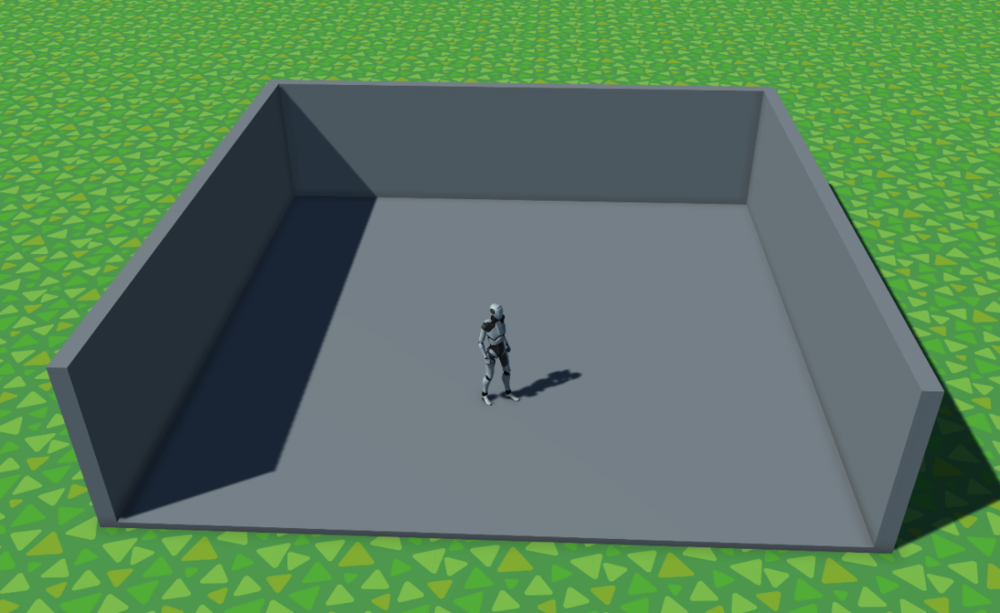
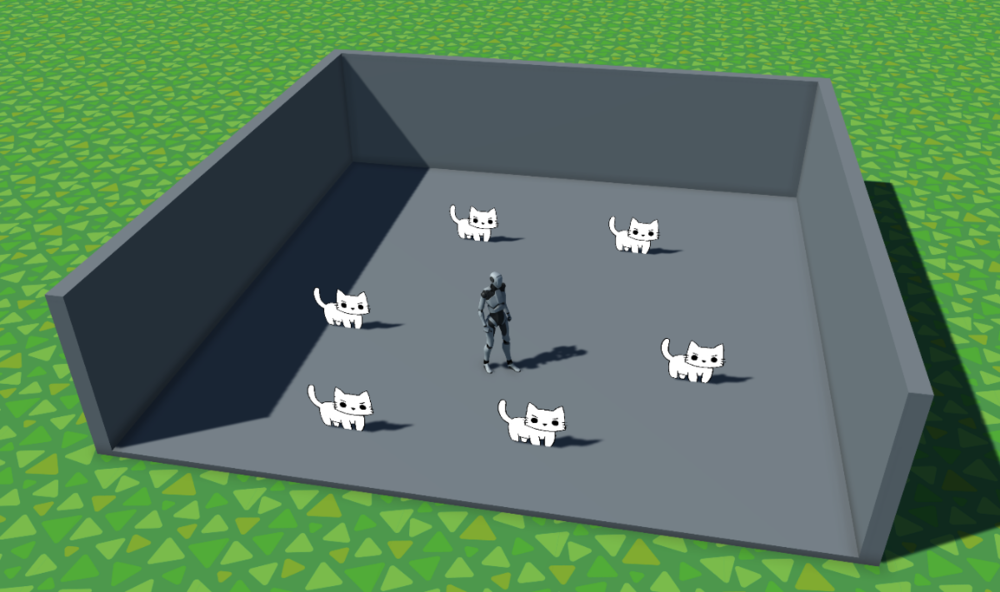
I did some cleanup today of the Moosecat Spawner. It now applies the data to the cats properly, shaved off some unnecessary data, and I've split out the "spawning" and "skinning" portions of cat creation. This way my different objects have specifically dedicated functionality. The end result is working just as well as the original. Additionally I noticed that the mesh renderer reference was inside of the saved data and that's pointless. I've moved that up a layer and now it is part of the prefab instead. The next thing that we need to establish is the room objects, specifically the logic for spawning and placing them. I'm still up in the air if I want to just provide enough "land" for each individual unit or if it would be kinda funny for the manor to be a finite size and when you walk in the inside is infinitely large (depending on how long you play). Additionally if we go the magical manor route I can just not have a ceiling when you are inside which makes camera work pretty trivial. I'm already convincing myself of this plan. While considering the size of the room I decided to go with a room that is roughly 10 square meters. The walls are roughly 2.3 meters tall. I may just put them up to a solid 2.5 we'll see. The end result is quite a spacious area which should allow for a lot furniture and other fun things. An immediate curiosity crossed my mind. I haven't decided how doors will be added to the rooms. Does the player add them? Do we automatically add them? Do we allow the player to move them if we add them? And even with this question. How do we handle the cutout? Would it be better for me to build the walls as individual tiled units? Something akin to drywall in a house? If I do this then we could simply remove the wall unit that the door is on and replace it with a "door frame" that surrounds the door to provide a seamless appearance. The alternative is going to be figuring out some kind of clever cutout shader. I'm going to probably approach this issue with the tiled wall solution first and if we see this causes any kind of major performance issues then we can see about adjusting to the cutout solution. I can only presume there won't be much problems given that games like two point hospital use the unit based walls. Obviously I just dragged these kitties in by hand, hence the white. But yeah, plenty of room for the cats. I was thinking that a player could "assign" up to say 4 cats per room. They won't be forced to stay in there but if there are utilities in that room that they can interact with they'll do so from time to time. You can probably imagine a kitchen where a kitty will make food for fun to feed you and all the other kitties, and of course themselves ;). Likely tomorrow we'll look into a title screen. Something simple, and then hook up the state machine transition from that screen to the debug game area we've currently got. Then from there we'll hook up the transition from outdoors to indoors. And start working out the nuanced problems in all these steps.
-
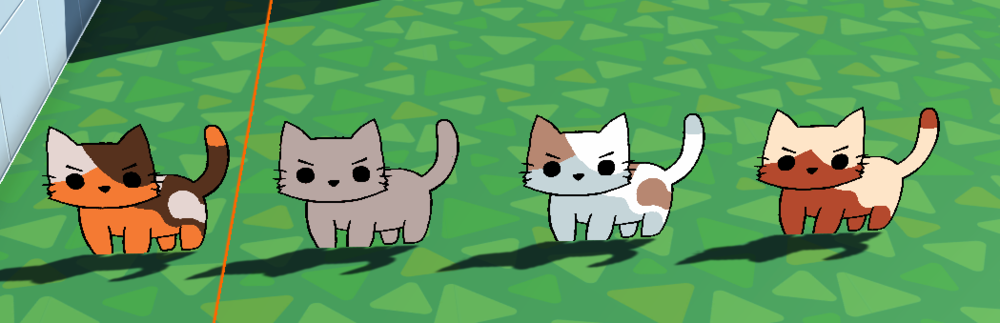
Alright. Another productive day. So we've moved into building up our skinning toolset. We use color replacement in order to take a few simple designs and give them a great deal of potential variety. Obviously for this vertical slice work these are all just variations on the original, a 1 color, a 2 color, and the original three color design. We've updated the generation and skinning process so that it can randomly pick a particular pattern for the cat and then it will choose colors from our color library to texture it. This texturing process actually stores the data inside the saveable data of the cat. So when we go to save the cats that information will be stored. Next we have the skinning system which takes in the moosecat handler, which houses all the different components we'll need to access to skin. Here we ask a simple question "Is this a fresh pass?" if it is that means this is a brand new Moosecat and we want to give it fully random colors. In the future this system may be overhauled to allow for genetics. But for now we are doing this since it is simple and functional. So I ran the spawner 4 times. We can see it generated a three color cat, a single color, another three color, and conveniently a two color. Each was colored at random and they look just real mischevious about it. Tomorrow I'll be working on updating the summary comments for what I've done recently and THEN we need to go in and hook this up to the saving. I believe it'll actually just work but the loading side of things will require its own actions later. So I'll want to make a note for that somewhere. Beyond that, I'm not sure. I'll make notes of the utilities we have available to us currently and then see what is next. We can technically already have an inventory, we can have kitties, we can walk around, we can look around, we can interact and collect objects. Perhaps the next step is I should design and implement the excursion system. Where we send our kitties off on adventures to find things. I'll mull it over tonight. (Also the joke is that the two ways are loading them from data or making a brand new one.)
-
Tonight was another one of my workout nights. After a fairly challenging workout I was then greeted by a kitten that really, really wanted some cuddles. I happily acquiesed and just played BG3 until she was done getting her cuddles. With that out of the way we dived into using a few of the working assets that we currently have. My very talented wife made me a Moosecat texture a while back. That's more fun to look at than a cube, sorry cube, and with this introduction I'm able to do some more work. Here we can see a number of texture types. The first is "one color", the second is "two color", and I bet you can figure out what the third one is called. Naturally in the future we'll have many different texture types and even some that can't even be colored. You can imagine a cat that just looks like a sparkling galaxy, or a deep void. These things would likely not have different pallets. The next thing I need to do is hook up the texturing system so that it first picks a type of texture and then it picks out the colors. Following that I need to have that data save to the cats Datum. That way when we save our cats we can regenerate them in the same fashion that they were first seen. A lot of this work can just as reasonably be used with 3D models, and who knows. If in the end we see a lot of charm with a mixture of 2D and 3D then that will be the journey we all walk down. I'm playing it by ear and seeing how everything pans out. Anything to bring joy in the end.

-
I stress in advance that I'm a bit tired so this particular update is probably going to read like garbage. Another productive night. I wanted to accomplish a few things tonight. The first is I wanted to be able to spawn anything. I might not know what those things are yet but I wanted the system for adding new spawners to be convenient. I also didn't want a lot of casting to be involved, so these spawners would at least be dedicated to the object they will be spawning. The next challenge was to make sure that these objects pool. We don't want to just be creating and destroying a lot of assets. So the major first step was adding a pooling system to the spawner. Conveniently I've already made an interface for pooling and was able to hook that right in. This meant that we had a spawner for our Kitties now, and that we could spawn them anywhere we wanted. But I hit a snag. I would tell them to move to a precise position and rotation but they would not. I would break point and everything looked correct. Yet when I went back into the scene it was all...well...not correct. I started mulling over what could have such an impact on position and it hit me. Oh right! The nav mesh agent! Our little cube baby was trying to protect us from moving it somewhere illegal. So it was just flat out ignoring my request. The solution for this was quite simple, I have the nav mesh disabled on spawn and it will be enabled as part of the loading process. I suppose next we should go with a complimentary collection of images and a gif. To basically close out the night. Tomorrow we will want to create the artifact for our Moosecat spawner so that other objects can trivially interact with it (and get data back). I'm not as sure that we'll hook up game loading to it for now because I don't actually think that provides us any value at this time. I know it'll work, you know it'll work, and making fake stuff for the sake of making fake stuff is just time wasting. pushycat.webm Well would you look at that. A bit hard to see I admit but we can see our cube at a 45 degree angle and, quite rudely, it pushes the player out of the way. We can also see the cat being added to the pool. The way our spawners work is they check for a pooled object, if they find one they simply return that object unpooled. Otherwise they'll create a new object and add it to the pool for tracking. Generally an object is pooled if it is disabled. Simple and clean without any need to communicate between the pooling array and the pooled objects therein. Alright! I'm gonna go rest! Progress is progress.
-
Here we are, a late night, I've worked out and even played a bit of games. But still we need to update on what was accomplished with the game. To put it simply, a bit more than I expected and yet I wish I had done more. Tonight we managed to accomplish adding in the Handler class for Moosecat Gameobjects, then we hooked in the Moosecat Datum to that Handler. From here we integrated the interactable interface and told it that, for now, we want that to add the pet kitty to our care. This isn't necessarily how it'll work in the future but we are just trying to prove the function calls will work as intended. collectionExample.webm The first cube is our inventory item example, think like an apple on the ground. The second is our Moosecat. We don't have that object be pooled because, at least currently, it would continue to exist in the tangible world once under your care. Finally, I wanted to see how quickly I could hook up saving and loading. Because being able to save and load gives us the power of progression and really is the foundation of an entire game experience. collection2.webm First, dang I really messed up how small I made that video, anyways. As we can (kinda) see here, we recover our last known position currently, and we restore our data for the Moosecats and the inventory. And that's that! It was quick and easy and a nice proof of concept for some of the systems I've built. We even update the artifacts that link to these data containers. So other objects can trivially gain access to them without actually having a direct reference to the object itself. This will be critical when switching scenes or even just spawning the player. Hopefully the state machine will prevent race conditions but it is also nice to just make them hard, if not impossible, to really happen in the first place. And yes, I'm aware that Unity is single thread and so technically you can't have race conditions. But you know what I mean. Next I believe we'll be hooking up a spawner. This way we can actually remove the cat that is currently in the scene by default and tell the spawner to generate it at load. This will be useful for all sorts of objects in the future.
-
No pictures today. But we've still made progress. After a hearty run of Randomized BG3 I started work on the collection system for Moosecats. This database will store all of the Moosecat information for each kitty that joins your care. These systems require creating the single unit object, I call those Datum as you've probably seen. Then it requires a Data object which is a collection of Datum with various helper functions for adding and getting data from the database. Finally we make an artifact that contains the Data Object so that we can easily share our data between any number of in game objects without creating a bunch of duplicates or otherwise doing something else stupid. With this done that means tomorrow I can add Moosecat data to our debug cat cube, which will probably be upgraded to a 2D Moosecat mesh soon enough. Then I'll let us "collect" it by interacting with it. In the future you will do so through adventures, eggs, and chatting with kitties. But best to walk before you can run. Get the support in and then actually hook up the more complex systems and demonstrations.
-
I had a bit of great fortune today. I spent most of the day playing BG3, only to find out that Minthara bugged on my run and isn't actually available at Moonrise Towers. I'm debating if I want to go back and see if I can get her to actually be there. But I digress, I played for much of the day and realized I still wanted to keep my momentum with my work. So I set out to make the inventory save and load. This initial hit a hurdle because I had included my inventory artifact within the player info class. This is a problem because our serialization strategy does not like when we save a scriptable object. I realized that a simple solution for this was moving the actual artifacts to my player handler, where it can assign them all (currently) on awake. Then the player info remains a very simple object that contains only other classes. It is treated as something of a network to access anything related to the proper healthy function of the player. I made those few changes, picked up a debug cube, and saved. It generated my bytes file and then I reloaded the game from scratch. With a bit of trepidation I pressed the load button hoping that I'd see that 0 turn into a 1. zerotoone.webm What you don't actually see is the player also moves to their last known position when I load. This was another bit of work I've tested out. The good news is that this saving and loading will scale to however many items we create going forward. Now that it works with one item it'll work with 100 different kinds of items. The initial foundational work of any project is not glamorous. But it is pivotal for being able to do the fun part of everything. I believe one of the upcoming projects I'll need to tackle is the dialogue system. This will be a rather large undertaking and I'm not sure if I want to do it now or, knowing that I know it is doable at any time, start doing other fun things and come back to it. I'll sleep on the problem and I suppose we'll see what my decision was with tomorrow's update.
-
Alright, the next feature we needed to hook up was looking around. This is already squared away for controller but with KBM (Keyboard and Mouse) this was a little less clear. Initially we had the camera always looking whatever direction you were moving the mouse. But as my wife wisely pointed out to me "So I need to let go of the mouse when I want to stay looking in a certain direction?" Well, the moment she asked that I realized I'm an idiot and decided that today I would be fixing that. So now, we have a button mapped to looking. Currently it is the left mouse button, but I think by default I'd rather it be the middle mouse button. Regardless we will allow for button mapping in game for the final release. So if there is something you'd prefer that option will someday be available to you. Additionally I needed to have the camera be able to zoom. In an ideal world I would have a nice easing between the minimal and maximum views. I've already added sensitivity but have not implemented an easing feature for the camera zoom. This isn't necessarily complicated and when I do get to it we can make that one of our updates on how you do that sort of thing. zoomies.webm So here we are! Another busy day and another step forward. I'm taking the approach to this project a bit like NaNoWriMo, because if you write a certain number of words each day then eventually you will have a novel. It might be good, it might be bad, but hey, you did it. And that's what we'll be doing here. Also don't be alarmed, I recognize that the current world service is A) suspiciously familiar in texture, and B) flat. This is just our testing playground and things will flesh out over time. I'm actually thinking I might have the initial game release with a relatively small area to play in. Then over time as we get more interest we'll keep adding more and more areas. Think of something like No Man's Sky with a long tail of updates but without the grandiose promises at the start. The best I can tell you is that my goal is to make your life a little bit better. We aren't even remotely close to that goal yet, but all things come with time. It is worth noting I should probably increase the frame rate on my ScreenToGif recordings.
-
Vector math can be a bit of a pain in the ass sometimes. You do some logic that is probably higher than you ever actually finished in school and the damn raycast is going off in god only knows what direction. So naturally you throw in a gizmo to draw a line to where it is going. You adjust the logic in the gizmo until it is precisely what you want. Ok, fair enough, then you copy and paste that logic into your actual non debug code and...ok...why is it not working? I'm looking at this object and my debug log isn't printing? Then you turn and once you are at an angle that can only be described as "totally wrong" suddenly you see your debugs. Sweet, ok. Well, at this point there are two choices. Choice number 1 is to keep working at it, waste hours of your night, and honestly be unhappy even once it is working. Or you can work a little bit smarter and come back to it later only if you need to. touchit.webm Alright, well, as you can see. I went with Choice number 2. What we are doing here is quite simple. I've got an invisible collision object that is in front of the player at a specified distance. In this way I can check if that object intersects with any collision objects. If it does, I check if that object is implementing the IInteractable interface. If this is also true then we interact with it. Doing so in the case of this cube will increment your "Debug" item by 1 and pool the cube. But we'll talk about pooling more specifically in a future post since I've been having busier days than I expected. Ultimately though progress continues. With each passing day we have another feature ready. The next thing I would like to tackle is actually how you look around. Currently with a KBM setup the camera is always locked to your mouse cursor. I would like to adjust this, per suggestion from my wife, so that it only looks around when you press down a mouse button. That way you can adjust your looking angle and then keep that locked. I don't know why I didn't think about this sooner but that's why it is always good to get a second opinion.
-
The next journey that I'm working on at this moment is the inventory system. I believe I've worked out everything that we'll need going forward. The first thing is that I'll be using a system not unlike Ragnarok Online to track the different items. We will have two kinds of enums to relate to every item. The first is their SuperType, thing of this like food, crafting goods, equipment, etc. This is used for filtering and not much else. The second, and much more important, is the SubType. This is the precise item that we are tracking. An Apple, Rose, Leather Jacket, etc. Unity has an annoying quirk where it will not serialize a dictionary. But we really want to use a dictionary for the item tracking. This is because we can use that SubType as the "key" to look up our data, and the item's information will be the "value" from our dictionary. So what I've done is created a system that synchronizes a dictionary and a list. The list is used in editor only for visualizing the contents of the player's inventory while I work and the dictionary is used at runtime and in builds. With this now achieved we have our dictionary of our items. So each item is a Datum, and the dictionary object is our Database. Finally I have created some ScriptableObjects (which I call Artifacts) to store this data in a nearly tangible way. By that I mean I can trivially take this object and attach it to other objects in the project. In this way our inventory can have a pointer to the same information without needing to double the amount of data present. Now that we've created our asset, the asset collection, and the linking system, the next thing I will need to accomplish is actually incrementing your values. We will be doing this with a demonstration cube. Tomorrow I will be hooking that up and maybe we'll have a simple gif or two to show off the work happening. That update will also cover a bit of the concept of "pooling" in my projects.
-
Outside of naming classes and folders, the next most complicated part of coding for me is the process of saving and loading. This is not because the idea itself is necessarily complicated. You are just saving some information as text (or whatever format you desire) onto your device. The major challenge for me comes in the most convenient way to have data that can be saved and also easily parsed within Unity. There are also some constraints when saving with Unity. Natively you can't save json strings that feature any content that won't naturally display in the editor. This means that things like dictionaries or multi-dimensional arrays are out. You can, however, create classes that contain the "internal" data of your 2D array and then have a 1D array containing multiple instances of that object. Each featuring unique data. You can think of something like the Moosecats falling into that category. Each index in the array is an object containing all the data of your Moosecat. And indeed this is likely how it'll work here but with some caveats. The first is that we are not saving to JSON, instead I am taking discrete units of data and converting them into bytes, saving those bytes to the player preferences, and then later gathering them back and converting it directly into the original objects. How are we accomplishing this? Well, the more detailed description will be available once I actually finish some of the more complicated collections. But for now we can talk a little bit about the player saving and loading. I'm going to use a bit of jargon here and I apologize, I'll do some write ups later on things like interfaces and classes to make it a bit more clear what I'm talking about. But here we go, I've created an interface called IOdinSerializeable, I name all of my interfaces with a leading I and then I try to make it obvious what they are for. In this case, these are classes that implement an interface that allows me to serialize it trivially with Odin Inspector, one of my favorite Unity tools that I recommend you get if you are interested in Unity at all. This interface requires you to inform it what "kind" of data you are saving. And with that it can actually handle the IO calls to and from the disk without any additional work on my part. Yay! This means that a line like the following public class HandlerPlayer : MonoBehaviour, IOdinSerializeable<DatumPlayer> Is literally all I need to do to make my player behavior saveable (which I'm noticing is MonoBehavior at the moment, I need to update that to my NotatedMonoBehavior). This will require the implementation of two very simple functions within the class. public void Load(DatumPlayer data) and public DatumPlayer GetSaveData() You can likely guess what each of these needs to do. But if it is non obvious, the first is how we load our data from disk back into the player. The second is how we get the data off the player for saving to disk. This will scale for any particular asset going forward. When we get to the Moosecats we will likely have a collection of all the kitties. Then I will save and load that entire collection to and from the disk in the same manner. In this way we've solved the core functionality of saving and loading for all systems going forward. When it saves and loads, and indeed what operations happen as a result of that loading and state update, are not as clearly defined. We will talk about those in a future scratch note, or perhaps something more detailed will end up in another section.
-
Funnily enough, I've always tried to avoid the term "managers" because they become catchalls. But unfortunately Handlers ends up doing that. A devil by a different name. My goal at the moment is to keep handlers at one or two precise operations so that each thing is compartmentalized. Otherwise you end up with monolithic classes.


