

Oafkad
Seraphim
-
Joined
-
Last visited
Everything posted by Oafkad
-
An interface is a promise between scripts. In theory these cannot actually implement functionality. I say should not because I've found a gap in C# where you can implement functionality in your interfaces. I actually think this is a bad idea. But it is also a really interesting one. Perhaps we will start a coding guide section and I'll put how I did it in there. I still suggest you don't do it, as you can't breakpoint, but the fact that it works is fascinating!
-
I am pretty sure I skipped a day lol... Anyways, I've come to the conclusion that I need to change up my development schedule. I'm noticing that on the weekends I'm usually pretty burned out. Between work and working out, I just don't have much left in the tank. This actually isn't the fault of this project, I really enjoy working on it. But I need the energy to do so. We are still going to have daily updates. Perhaps I'll take some time on Weekends to update documentation. Or if I'm feeling energetic get some coding done. But I don't want to stress or strain myself and ultimately get little to nothing done. This all said, today while we did take a very long bike ride, and I am physically and mentally drained, made some good progress on the game! Our GUID updating system now should properly not update anything beyond the first time. So if we clone items they'll be updated properly, and when we load for the first time we won't nuke anything that already had been updated. I've fixed the bed item as well. It had some issues with navigation that are now resolved. Finally, the adventures themselves are moving along at a good clip. I was hitting a lot of bugs today, and putting them down just as fast. As I was updated the code I was also updating the PUML you saw yesterday. So overall I'm quite happy. With that all said, I'm now going to relax for a bit and play something. Help refresh my mind and body and we'll see what tomorrow brings.
-
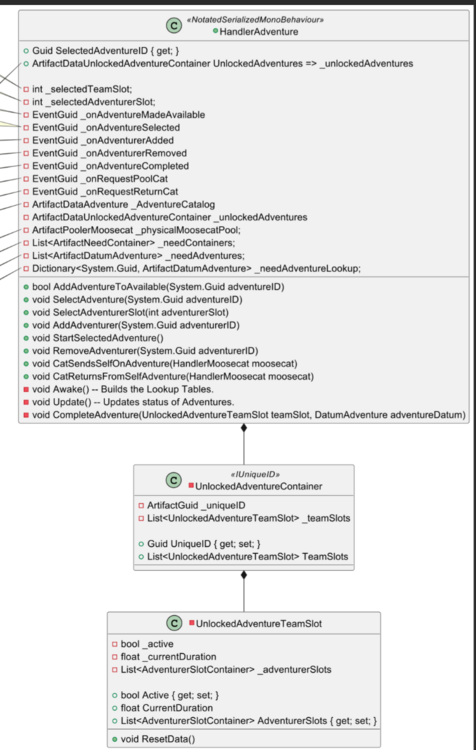
Today was one part updating Unity because of a bug with the specific version I had, and another part UML documentation! It is nowhere near done but I'm writing up docs on the adventure system so that I can more easily integrate new features into them. As you can see we don't have a lot, but this is the beginnings of it. Adding commentary to every function and attribute so that I can better keep things in line. Cause I'll tell you, this brain of mine struggles sometimes. Especially when we haven't touched something in a bit. And in the case of Adventures we made it a bit ago and then came back to it with a needed overhaul. I should have all this finished tomorrow though so I'm not too vexed. Then after I write this up I can think about what I'm missing. But per usual, the real life Moose is heckling me and telling me to get to bed. So I suppose I better do so.
-
I believe we will need to clean up the Adventure system in the future but for now it is in a pretty good place. What we do for cats added by themselves is as follows. Has any cat run this kind of adventure yet? If no, add this kind of adventure to our unlocked collection. We do this so it can be saved and loaded. Next we ask if there is an empty team slot on the adventure. If yes, we add this cat to it and start it, huzzah. If no, we create a new slot and add it. Then we raise the send cat on adventure. This allows us to effectively cache slots for these adventures. Which does make me realize I should probably standardize this logic and add dedicated calls to do so. Overall though looking good!
-
Alright, we are partway through the cats adding their own adventures. I'm taking notes as I move along. Our main challenge is that Unity doesn't serialize dictionaries and they don't serialize Guids. I need both of these things. I'm currently just building these on awake. But I think what we could use are some simple container objects that we can add to behaviors. Scriptable objects that act a bit like a dictionary. In fact...thinking on this, Odin can serialize our SOs so we can literally do this. We'll have the adventure containers be the keys and the need satisfying adventures be the values. This is stupidly simple, I'm a little annoyed it didn't cross my mind until I wrote this. You know what? Tomorrow I'm going to write BEFORE I code and see if I come up with ideas before I go. That seems like a good plan.
-
We have now reached the point where none of the work is throwing errors. That's always lovely, this means that we can now move into having our Moosecats add themselves to adventures. Today was a long workday so I didn't have as much time as I wanted but did manage to hit a good point with this work. It feels like by around Thursday or Friday we should have the setup complete for our Moosecats to go on adventures when they can't satisfy a need and then return a bit later. Can also experiment with them bringing back items and dropping them near the player, that could be very cute if it works reasonable well. As always, feeling good about progress!
-
Ok! Progress is moving along on adventures. I feel it'll probably take most of this week given how exhausted I am in general. Not with coding, this is always a treat, but just combining it into days with working out and a literal job. The adventures now track how many teams an unlocked adventure supports by default, and how many slots each team has by default. It generates each team slot, then populates their fields for adventurers, and saves all of that to the unlocked adventure data that we store to the drive. I believe with this change, tomorrow we should notice that we can add an adventure trivially and have any number of team slots running actively at the same time (that code was finished on Sunday). Following that test I'll get the Moosecat hookups working. Each Moosecat will create a one slot team in the related unlocked adventure, add themselves to it, and set it to starting. In writing that I realize I don't think I have much to go! But I'm gonna head out because the literal Moosecat in my house is purring and keeps walking in front of me while I type, I believe she wants attention.
-
So this has actually been a bit more of an update than I was expecting. But I think we can discuss the high level of it. I'll do a more in depth document soon for my own sanity as much as yours. First I suppose we should figure out what the problem statements are. The first is that we want our adventures to trigger a series of actions when they complete. What these actions will be are undefined but we'll just add them in the sequence we want them to happen. The second is that we want our Moosecats to be able to trigger an adventure on their own. This is to satisfy their needs and it needs to be infinitely scaling. Now that we've got our two problems, in this case when I say "we" I mean you and I, we now need to talk about solutions. The first is actually already solved, we use the same GameAction system that we used for items. We simply pass each of the Moosecats through the actions, ignoring them where applicable, and doing whatever needs to be done to satisfy all the needs of our adventure completing. The next was, and still is, a lot more work. We need our adventures to not be singular entities, we need to have each unlocked adventure have a collection of "teams" it can support. That is to say, a number of instances of that adventure that can be running. We may never have more than one on the regular adventures, but for the Moosecat automated ones we need to be able to have arbitrarily many of them running! Naturally this is a rather large change, so I need to go through and update the Adventure logic that was assuming only one adventure at any one time being tracked. Now that "adventure" is really a team within the unlocked adventure. We are maybe 60% through the revamp, I'll be taking a break at this point though and finishing up the rest this coming week. Good stuff though!
-
Welp! I intended to do adventures first but it turned out we needed to do items! The good news is that I can use the same system for the adventures once I get to that tomorrow. There is no bad news. We can now create action lists to happen in response to something. Currently I only have one action list, but later we can have one for collecting, one for consuming, and so on. These action lists look something like the following: A keen eye might wonder how you can "collect" something and "consume" it (thus satisfying your need), but there is a reason this works for now. Players do not have needs that are satisfied, but they do have inventories. Moosecats have needs, but currently don't have inventories. So because of this nuance the system works as designed. Now in the future we'll have split action lists for each. Things like "Game Action Pool" would be in both, but one would have the adding to your inventory, and the other would have the satisfaction. Additionally when we add in the GUI where you can use items from your inventory we'll be able to just reuse these actions, or a system that is very similar. So tomorrow, we'll be doing something like this for the adventures. So that we can have each adventure act in atomic ways, no need for large complicated hard coding. Treat the logic more like lego.

-
This weekend we'll be finishing up the adventure work I highlighted in the previous post. Then after that I've got a solid idea I think for items. We won't have "Collectible" Items and "Interactable" items etc, we'll just have "Items" and use interfaces to determine what cool functionality they provide. This will simplify the maintenance and really make it so we can add functionality at any time without needing to overhaul TONS of items, or create class after class. Obviously each item will have unique functionality (to some degree) but we won't be enforcing much at the base level. I forget the terminology but basically we'll code them through promised functionality rather than strict inheritance. As I always say, should be fun!
-
Today you can join me in thinking out loud about solving Moosecats sending themselves on adventures. We presumably need 1 adventure for each kind of need that can't be satisfied in the map. For now this means that we will have a relaxation adventure, an adventure to relieve boredom, and an adventure to refill their tummy. Currently the adventure system assumes that you will have an "active" adventure, this is the one you've selected from the menu, and you will add your Moosecats to that active adventure. But in the case of automatic adventures we don't have one selected. So instead we need to select a specific adventure and send our Moosecat on it. These particular adventures are defined already, or will be once I make them, so I suppose I could just make Artifacts for each of them and add them to either the node point or the handler. I suspect the Handler makes more sense. We can achieve this with a new function call, SendCatOnAdventure should be sufficient. From here we could actually read the "needs" on the Moosecat, and send them on an adventure based on that. So we'll make a collection that contains the need ID as the key, and the resolving adventure as the value. Then we can simply set it active and pool the cat. This requires either adding that logic to the function OR creating a new function for StartSpecifiedAdventure or something similar to that. We'd pass through the adventure to be started and handle the starting inside of that. I've got a pretty bad headache tonight, so I won't be doing this for now. But this will be my gameplan tomorrow. I'll leave this open so I don't forget.
-
Working through the catalog system now. One of the first we need is for prebuilt kitties. These will be our friends like Moose and Bean. Because obviously they'll have a specific look. But other custom kitties will exist beyond this. I'll need to have the collection store both the cats themselves and some ID Artifacts for easily finding them in other work. This will require a bit of thought on my part, maybe I'll write something up tomorrow. For now you can find them via the unique IDs assigned to them, but that might not be entirely sufficient. I may also add in a getter lookup by string, or something else identifiable. If we do go the artifact route we can just include those same artifacts on the classes that'll be making the request to spawn our kiddos. Many options, whatever we settle on needs to be fairly robust. Luckily the way the catalogs work you implement the getter largely agnostic of how we will index it. Maybe with ints, maybe with strings, maybe with Guids, but that all comes from the secondary interface that you attach to it. This helps allow us to have a single kind of catalog but have it work for anything. Currently we return strongly typed objects but I may end up going with loosely typed since this won't be happening very frequently.
-
While I wouldn't say it is perfect, in fact I want to update it tomorrow. We now have a working component caching system that works for both the class name you are looking for, all interfaces that class implements, AND any parent classes it inherits from. In this way we can use it a lot like get component but it'll be much faster and not require searching each time. Now with this in mind, something I want to do is have it cache lazily. That is to say when you "return component" it will find the component, cache it in all the different ways we need, and then return the cached entry. That way we only store exactly what we need. This should be helpful seeing as there can be a lot of components on an object and we might never need most of them for editing. We'll also have it cache all the components you need from the children as well, whether I'll add "ReturnChildComponent" or just have it work seamlessly I'm not sure. But regardless I'm happy to see I sorted the issue of using interfaces for lookups. Not a bad bit of progress after a long weekend staring at celestial bodies.
-
Today was quite an experience. Truly something that I was never expecting to see. And I'm happy to report I did not blind myself. Also last night when I should have been sleeping I had a revelation about naming conventions for collections of data. We'll use DataBase to represent any collection of data that can be modified at runtime and Catalog for any collection of data that is read only. I'll adjust my classes when I get back home tomorrow to meet this. The nice thing is that will also mean that I can tell which is which much easier, right now they are kind of interchangeable and I think that's not good for my own mental capacity. Anywho, have a great night!

-
Alright, we've got our adventure system that currently rewards items. But what I need to do is have the rewards be actions rather than just raw items. In this case we can have the actions be something like "reward item", or "refill moosecat state", etc, etc. With that in place we'll be future proofed for all adventure outcomes. I also noticed that I've got some foundational code that is currently featuring manor only code. I'll just need to go back through that sometime and fix up those connections. Things like saving and loading should work in all of the game projects. But for now we can't stress about it too much, just need to make note of it and focus. This is a healthy process to me. Trying things out, making them work, and upgrading them as we find new needs. The alternative is planning for months before you ever start and then realizing you missed things anyways. I much prefer this process.
-
Over the next few days I presume I won't be getting a lot done. We are preparing to see the eclipse and that means I'll be away from my standard hardware. However that doesn't mean we won't be able to do a little bit of theorycrafting as we lead into the next steps. For now I know what I need to do is get the hooks in for our Moosecats sending themselves on Adventures. We know that we can do it through UI (or direct function calls) but we haven't discussed is how to handle it happening automagically. Can the same adventure be running with multiple instances at the same time? I mean...do multiple people go on vacation to Hawaii at the same time? Probably. Also, a random thought just crossed my mind. You ever notice how people say "we" when talking about creative ventures? Even if it is just them. Currently that is the case with this work. I wonder what compels me to say "we" sometimes. Very interesting. Anyways, I think what we (this time I'm talking about you and I) will want is for each adventure to be able to run arbitrarily many instances. If someone wants to send 300 cats on a mountain climbing expedition at the same time that's their deal. If their kitties are happy and willing to do it then it will be done. Ultimately nobody has the power to make Moosecats do what they don't want to do, so there are no worries there. I'll need to update the code to support that, but it shouldn't be too bad. Will also need to think about how the UI will display that. But these are all fun challenges. Nothing so far has really been miserable and I think that's a good place to be. It should be funny to see just how much it all changes over time as I hit walls, have new ideas, or just adopt new coding styles.
-
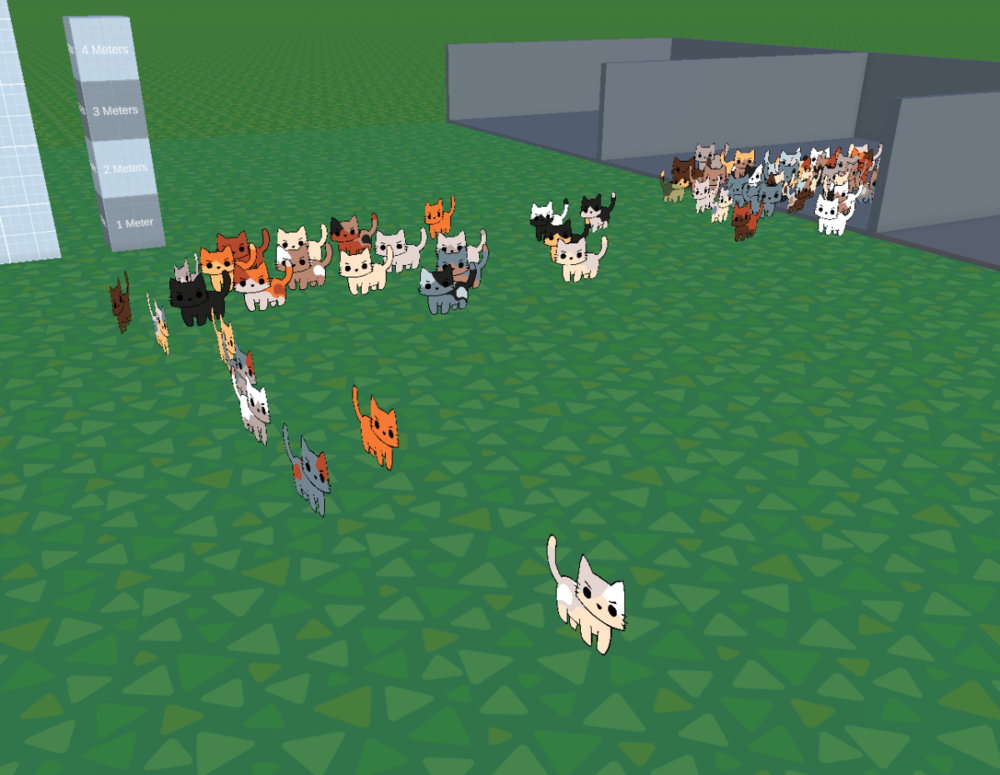
I've now setup the logic on the Moosecats to work as follows. And I'm pleased to say that it looks like it scales for hundreds of kitties. So basically our little friends will notice they are, for instance, hungry. If they are, they will search out for food. If no food exists they will say "Tata!" and go on an adventure to find some themselves. In the example below we aren't yet de-spawning them and sending them on the adventure. But you'll recall I do have support for that from a month or two ago. So next I'll hook them into that system, updating their needs, so when they return they'll be happy and healthy and who knows...maybe they'll bring some presents or new friends! I want even the failure states to result in positive outcomes. They might be slower than optimal play but you can relax and just enjoy yourself. cubeseanceSmallest.webm It is amusing how few frames I have to put into gifs to make them only 1mb.
-
Spooky. Got some kind of ghost in the machine, I just set my cats needs all to critical and it methodically found each solution to each need just fine... I'll keep an eye out on this, I'm clearly missing something for the occasional bug. I've been improving my debug logs and assertion to make errors easier to solve beyond just "problem at line 5, best of luck bro." It was food. The little buggards are eating all the food and then when there is no food left they panic... Yep...these are cats alright.
-
I love watching the systems fleshing out in the game. We have issues, certainly, but over time, more and more of it is coming together. We still have an issue with needs for the cats but this comes from the new artifacts generated to store our data. The ease that you can access any component on any object has really pleased me. I do have a bug involving polymorphism which I think I mentioned, I haven't solved that yet, for now on those RARE cases I'm going to just use getcomponent for now. Once I have time I'll look into it more, find a smarter way to hand the key side of the key object dictionary. And as I'm saying this to you I'm realizing... We could always save and grab the base class and when we return it we could cast it to the type you are looking for. That would always work. I should try that tomorrow after work. Good job past me, future me might be so proud of you if this works fine.
-
I'm almost finished with the first draft of the world item database. This will be our lookup table for all the items that are in the world for our kitties to path out to. We could find this data each time a cat is curious, updating it constantly, and generally just making a lot of garbage. Or we could track it through a table like this and have a fairly consistent memory footprint. I do have a bug with my component return feature. I'll need to look into that and see what I'm forgetting, it'll likely be obvious and silly but for now I'm not entirely sure. Otherwise I don't have much to add! I don't have any gifs for you at the moment but the cats are able to navigate around in the hundreds and I even tested up to a thousand at one time. In that scenario my framerate dipped into the 60s, but that does mean that about 1000 cats results in an FPS dip of about 50%. I don't expect we'll have even close to that, I imagine the actual cap will be 25-100 or something around those lines. With some way to store additional cats, or perhaps multiple islands. We'll see how it goes. But overall it looks pretty good. I think one of the next things we'll discuss is the spawning and linking system over in the documentation section. That way I don't forget what I did in the future :).
-
What I Forgot Usually these won't be the day after I write things, I hope, but we got some things that were missed! Remember when I said there is a save function and a load function we need to think about? Well I totally forgot! Lets talk about it a little bit. /// <summary> /// When requested, will load the player data into the appropriate sections of the player class. /// </summary> /// <param name="data">The incoming data to load into our player.</param> public void Load(DatumPlayer data) { _playerInfoArtifact.Value = data; transform.position = PlayerInfo.Position; _inventoryArtifact.Value = PlayerInfo.Inventory; _moosecatsCollectionArtifact.Value = PlayerInfo.MoosecatsCollection; _unlockedAdventuresArtifact.Value = PlayerInfo.UnlockedAdventures; _worldItemsArtifact.Value = PlayerInfo.WorldItems; } /// <summary> /// Returns the data that we want to save for our player between sessions. /// </summary> /// <returns>The player data to save.</returns> public DatumPlayer GetSaveData() { return PlayerInfo; } When we load we need to apply the loaded data into the related artifacts. This also means that I need to check the Artifact for the Player Datum and make sure I have no null fields there. Otherwise I will save and load a null field. Realistically what I SHOULD DO, right now, before I forget (and I won't) is setup the loader to populate a fresh data body when the information is null, rather than loading null. Someday man, someday we'll actually do things the moment we should. Today will not be that day. But now we know what I forgot!
-
The goal of this post will be to cover saving and loading. I sometimes forget how I do it, which might sound ridiculous to you, but when you have as many systems as I've already got then it gets a bit complicated. What we are going to do is break it down, where I need to put data and how the storing, loading, and accessing is done. Player Handler -> Player Datum One thing we have to know is that our serialization system is limited when it comes to what we can serialize. It is highly advised to not serialize Unity Objects, Prefabs or Scriptable Objects. However, I really really want the data off of these silly things. So I started thinking about the best route to take for this. Ultimately I realized that there is one thing that we know will always exist and that is the player. So we could trivially consolidate information through the player handler. This does not mean that our player handler is enormous with a bunch of functions and variables to cover everything about the game. Instead the handler contains two concepts; the first is the Player Datum, this holds all of the saveable data for the player, the second is the artifacts associated with all this data. These are scriptable object containers that any asset in the entire project can reference. /// <summary> /// On awake we update all the artifacts to reference the saveable data. /// </summary> private void Awake() { _artifactPlayer.Value = this; _inventoryArtifact.Value = PlayerInfo.Inventory; _moosecatsCollectionArtifact.Value = PlayerInfo.MoosecatsCollection; _inventoryArtifact.Value = PlayerInfo.Inventory; _unlockedAdventuresArtifact.Value = PlayerInfo.UnlockedAdventures; _worldItems.Value = PlayerInfo.WorldItems; } So as we can see here, we've got our various artifacts, and I'm noticing I need to update the name of a couple, but regardless, we have them connect with our player info via reference. This way anything that updates any of these artifacts is automatically saved and loaded when the player is saved and loaded. Could we split this up further down the road? Of course! Will we? If we find that it is helpful. But for now this is the simple solution for making sure to save all of the data. But then how does loading work? Savers and Loaders We have the concept of saveable and loadable objects. These implement the IOdinSerializeable<TDataToSerialize> interface. This is an interface I created that will save and load your data to and from binaries as long as you define the type. There are two virtual functions that will need to be overwritten on any of our savers or loaders. These functions are what handle the object specific saving rules and the object specific loading rules. For saving, for instance, I have a rotating saver mechanism for the player data. This will save your data to a specific index each time you save, rotating by one up to the maximum number of backed up saves you are allowing. This way if data is corrupted on a particular save, or if you made a mistake, you can just load a prior save. For our loader in this example, it loads the data then raises an event to tell the state machine that it has loaded. This allows us to move from say, initialization state, into the intro or gameplay state. This way we never have to worry about race conditions, objects loading before the game is ready to handle them. Caveats So the one thing to remember with this current system is that we need to remember to create an artifact for the data that will be saving and we need to make sure that we add that artifact to our player data. Finally we need to make sure that on awake (or elsewhere later in the game's life) that we assign a reference from that artifact to the data sitting on the player's datum. This allows us to have artifacts that also serialize without issue AND without creating custom savers and loaders for every little thing. It is fast and efficient which is quite nice. Steps in a Nutshell Create Datum Create Database to contain all variants of that Datum Create an artifact that houses that Database. Add an instance of that Database to the Player Datum. Add a reference to that Artifact to our Player Handler. On Awake, point that Database Artifact to the Database stored in the player info. Data now saves and loads without any additional work! It looks like a lot but honestly steps 3-7 take a minute or two and we never have to think about it again which is nice. In the future I might write an editor script to create and assign all of these pieces. Maybe that could be a fun project for a weekend. Though the further along into the project we get the fewer and fewer of these that we'll be making.
-
So off and on for a few weeks I've been toying with having a unique identifying value for each object in the scene. A big part of this is just being able to guarantee uniqueness and to keep the data that guarantees that information as small as possible. I tried a number of things, some involving pretty complicated editor scripting, and ultimately in the end I felt like the effort wasn't really paying off. I was making something that would not be fun to maintain and might be hiding secret evils in my future. I decided today that I would instead have a catalog (well Artifact) that tracks every item in the world. I specify item here, because we don't really care about things that our actors can't interact with. This catalog will track the position of the item, the unique ID assigned to that item, the unique ID of that Item's type (food, furniture, etc), and finally an unsaved reference to all the components on the item. This last reference gives us access to the gameobject, the transform, and all the components we add to it which is very helpful! Something I need to do is have all my items have a base class that they inherit from. There is no real reason to not have that as an item is an item. Some are consumable, most are interactable, but at the end of the day an item is an item. It sounds like a simple concept but I haven't needed to do it yet, so I hadn't done it. That's kind of the gotcha, really, with knowing a bit too much and yet not knowing enough. You can create complicated solutions to simple problems and in doing so miss the obvious simpler paths. Simpler isn't always better, sometimes it can result in really heavy computation and bog down your experience. But we can't stress about that at the start. We need to experiment and try new things and when systems fall into place and feel right that's when we start to set rules. With that in mind I'll be doing some documentation soon that'll cover various things like saving and loading, artifacts, etc. This is in part so that future me doesn't forget how my systems work! But for tonight this was good enough, this was a less fun refactor than most but the end result I think will be great. With a little bit of work (a new action in the state machine) I can add all the objects in the scene to the catalog on start. The one rule is that we'll need to make sure that each asset has a unique position (thus why I track position). If this becomes insufficient we will explore serializable ways to track them. The big thing is that these trackable options must carry with the asset at all times. I could probably write an editor script that just iterates through every asset and gives them a unique integer, and then that is stored. Moving the object around wouldn't change that. New objects would just take whatever that index value is and add one to it. This likely would be sufficient, and would only limit us to something like 2 billion items in the world before we have issues. I'll come back to that thought tomorrow perhaps, but it is getting late, per usual.
-
Alright! First we've got good news, N number of cats is now working with the state machine. My individual cats all have their own behaviors and are walking around, eating, sleeping , etc, on their own time and personal needs. This is HUGE! I'm very happy with this and it will be a good stopping point for the night for me. A very, very large commit to be pushing. I've moved away from custom plugins for Guids and Dictionaries, I've just spun up my own solutions and they work without issues. This will also help reduce variables going forward in case anything breaks. Also for those of you playing the home game, I realize now my mistake on ID management for assets in the scene. I had been assigning custom IDs to assets as they were spawned. This is fine "in theory" but what happens when it is something like a Moosecat? Then you've got two unique IDs for the same asset, one is their Moosecat ID, and the other is the ID of their gameobject. This is not acceptable and was a big part of why my state machine work wasn't working as intended. So going forward I'm going to actually take my design from they player and Moosecats and pass that along to the items and interactables as well. These assets will have their own internal data structure that tracks their ID, state, and anything else we need to know. Doing this means I can serialize and deserialize this data trivially, I don't need to clone SOs each time an object is instantiated, and in general it reduces complexity by literally 50%. That's all upsides and will be the source of my work tomorrow. Once that is done we can probably move onto integrating some wild Moosecats for fun and see how many we can spawn before it becomes a computational problem. Maybe we'll track some metrics tomorrow to show off!
-
So I've noticed that the serialized GUID system I'm using is struggling with equality in certain situations. So my plan is to actually alter my design tomorrow slightly to just use regular system.Guid. This will help reduce the chances that we might hit a wall later with this system and it'll reduce the variables by 50%. I don't think it'll take very long but it is the source of my cats being a little hokey. So tomorrow we'll update this and I'll try to write my update earlier so we can get more details! I'm just excited at how quickly I ironed out the issue.


