

Oafkad
Seraphim
-
Joined
-
Last visited
Everything posted by Oafkad
-
So! Sorted the bug that was giving me tons and tons of copies of the items to our inventory. It was actually quite simple and very silly. We might as well cover it really quick. The original code, first adding, and then removing. So the mistake here is very subtle, specifically how does equality work with Datum? For two datum to match they must be the same in ALL ways. Their name, their ID, and their count. But what if, lets say, you are adding a single copy of an item to your inventory and you've got...oh I don't know, 25 of them? Well congratulations you just got another entry in your inventory. Following this we increase the count of the original instance and thus you are left with a 0 entry of your items. So what did I actually need to do? Well there you go! That was a very silly mistake, but at least it is good now! I also realized I haven't tested adventure recovery when saving and loading. We won't do that this week but I've got it on my mind. Tomorrow hopefully we'll get even more done! I'm pretty pleased with catching this bug, as small as it is, AND getting most of our lawn mowed.


-
Alright, I've hooked up the UI slots to be buttons. Now when we click on them they'll inform any listening systems of their unique ID. I did notice we've got a bug where your inventory is kinda "growing" when it shouldn't. I'll need to look into that. The reason will probably be pretty amusing and stupid, that is the way of things most of the time for me. Next steps will be hooking up the action bar to listen for these clicks. The main action bar handler will just be listening for the event and will assign the item to whatever your currently selected slot is. We'll see if we like that, in the end the preferred method might actually be clicking an item in your inventory THEN pressing the key you want to assign it to. May try both, might eventually implement support for both and let players decide. Guess we'll see! Sadly I've had some long days and early mornings so I can't do more tonight.
-
Alright! This week we will be touching up some of the UI. None of this will be final but it gives us some feel for where the game can go. I think first we will connect the inventory to the action bar and then we will go from there. No pressure just fun! That's the plan at least 🙂
-
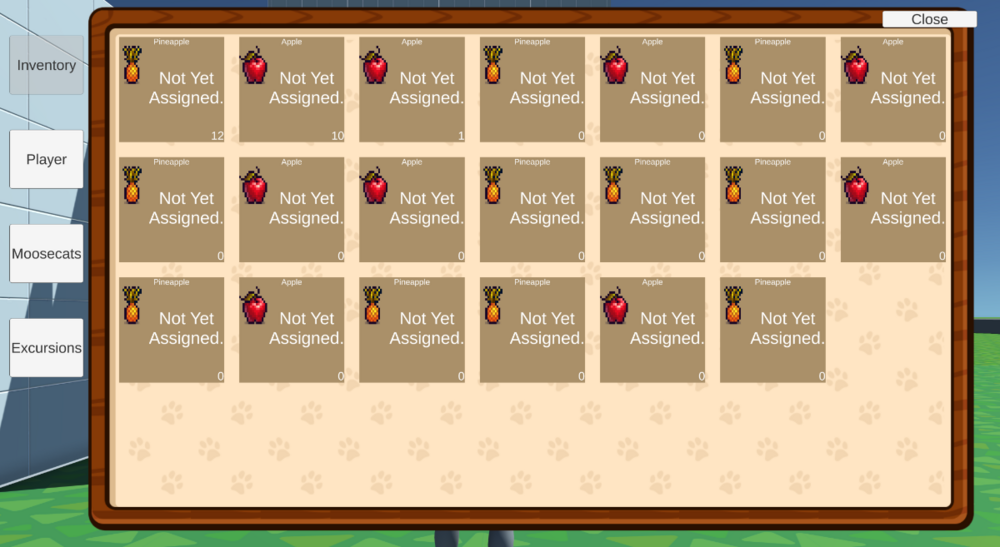
Today I did a little bit of UI work just to help unwind. It was a long and busy week and I both didn't want to do anything but also didn't want to do nothing. Stuck in some kind of weird middle state, I did a little. What was amusing once I was finished with some of the first pass code for the inventory was it revealing an issue with my character. As you know I had ID issues with my items. What I hadn't noticed was that all the prior iterations of the items have been sitting on my player this entire time. That's pretty amusing, all things considered. Sometime soon I'll clear out my inventory and save my player, just to fix that up.
-
I find that UI work is both incredibly rewarding once it is finished and incredibly taxing while you work on it. Ever interaction point from people requires a lot more effort than linear systems. There are many intuitive ways that people expect things to work and making all those things work in harmony is quite a chore. I'm not sure how much we will get done tomorrow but I do think once more of the initial developer UI is done that the experience will start to feel more tangible. It is one thing to see an editor window updating but a whole other experience to see it live in game.
-
Hey Folks, Alrighty, done some updates. They ended up being more world modifications than actual action bar updates. The next steps though are pretty clear once I recover a bit more. We will hook up a simple inventory that reads our current items. When you pick up an item this will inform the game to add the item to your inventory. Upon doing this it'll check your action bars for an empty slot. If there is a slot it will place a reference to that item in that slot. Otherwise nothing happens. Then following that, we'll want to have it so when you are in your inventory. If you left (right?) click on an item, or perhaps some other key we'll see, when you use that key it will assign the item to that spot on your action bar. If that ends up not being annoying we'll stick with that for the time being.
-
Hey Folks, So I slightly recovered from the work week. Only a bit. But here we are! It isn't pretty but I've got the start of our action bar setup. The fields update when you press one of the keys, through the magic of events. Next I need to setup it actually showing the items you have in each spot. Probably have item pickups fill in the first open space. That's all I have for tonight though. Take care of yourselves! actiontime.webm
-
Today I think is an important time to just take a step back. Only for the day, work has been extremely rough these past few days and I'm officially out of steam. But when we come back, tomorrow I'll whip together a simple GUI to test our our action bars and throw up an image or two maybe, if the day is kind. Take care of yourselves and thanks for the random visit, internet strangers.
-
It will eventually be mappable but the action bar support is added to the new unity input system. For now it defaults to 1 through = on your keyboard, but we'll eventually add in support for things like shoulder buttons on a controller. There is now an event setup that will inform all listening systems that the player has pressed one of these keys. Tomorrow I'll be hooking up a simple UI of some kind to alternate between these. What I haven't determined yet is how we will represent our items on the action bar. I'm not sure if they will have unique 2D art made for them or not. Heck, there is nothing stopping us from making our items in the scene 2D as well, perhaps doing the ole cross cut style of "3D" 2D art. I'll give you an example of this tomorrow.
-
I've added a new data collection to the player data. We've now got 12 slots available for an action bar. These are IDs that would match up with items in our item catalog. So now, lets think about how the interaction will work for the next code pass tomorrow. First I'll just set the keys by hand to match a few of the items we support. Then we'll hook up the input tracking for 1-12. If you press one of these items then we'll print out the item in that slot. I also need to add an integer to the player data that tracks the "current" item. Have it default to 0, but otherwise it'll be whichever number you pressed last. Just added that before I forget. So you press a key, we set the "current" item, then we need to pass this information to some kind of processor. Perhaps that's what we'll call this as opposed to a Handler. I suppose its really just two words for the same thing. But I kind of feel like Handler's are monobehaviors and I would like a ScriptableObject to take care of this. That object will reside on the input controller because that's where we get all of our input information. Then pipe in the index to the "Select item" function. The SO will hold an artifact reference to the player and the item catalog. In this way it can set and get the index that was chosen on the player for saving and loading. It can also cross reference the GUID stored in that spot with the catalog to get all the item data. From there I need to raise an event for Holding a particular item. I'm not sure what kind of class will handle this yet, but it will be dedicated to the player holding items to use for interactions. Now that I think about it...our game actions on items will be really useful for this. I can have items do various things like heal, water plants, or so on. Nice! I'm glad when past me is looking out for future me. I think this is sufficient guidance for tomorrow.
-
Hey Folks, So the next thing I want to setup is holding items. If we want to place items it makes sense that we'd need to be able to hold them. I haven't really thought about how we should do this but I'm going to spitball here and see what captures us. The Player Handler only does a few things currently: Saves and Loads Player Data. This actually also includes WORLD data as well currently, just out of convenience. It tracks the player position and updates that positional data. Contains the various artifacts critical to the game running so that they can be saved and loaded to. That's not much, in fact 1 and 3 are basically the same thing. I think the lean nature of the player handler is very ideal. I'm going to try to not sully this in the long term. And just as I'm writing this I realize I'm forgetting about another class on the Player Object. Our Player Input Handler takes care of all the KBM or Controller inputs of the human player. Well maybe Human, maybe cats will ant to play this, I don't judge. Regardless, we have a class that handles this information. I worry that this class has gotten far too big, basically the inverse to our player handler's lean nature. So what we can do is create an HandlerInteractorPlayer component, this will be the container that houses all of our interactor logic. Likely including rulings like "open handed" or similar. It will also pipe the "currently held item" back and forth from the player data inside the player handler. We can connect this to our Player Input Handler with an artifact like everything else. From there we can communicate player inputs through the interactor. This does leave me wondering if I want to break up the player input handler into some ScriptableObjects rather than multiple components. This would be easier to pipe into a game menu elsewhere. Perhaps that will be our first experiment this coming week. I think we'll go this route, make the base class with all our functionality then contain it within an artifact. Sure...ok. For now I think we only need to track what item that is selected. For now that can be handled with some keyboard commands, but later will likely be h...oh! I'll have it be the number row, maybe this will be a good time to put in a dummy UI for your inventory quickbar. Fun! Ok, that's it then. See you this coming week!
-
No matter how hard Manor Lords tried, I did manage to do a small bit of work tonight. Trivially added a new action to the adventure system that lets us reward items to the player. I'm really pleased that it only took a couple of minutes, this suggests to me that I'm on the right path with that design. In the future I think I'll want the actions to be coroutines, just so we can yield on some as needed. If I've mentioned that before already, welcome, I'll be doing that a lot over the next few years. Lots of things to keep stuck in my brain and some of it loops.
-
I got it! Our action system works great with the adventures and provides us with a ton of flexibility with each new adventure. In this example our kitty goes on the adventure, then after the adventure finishes, they return and their need is satisfied. Tomorrow I'll see about doing an item award to the player. Obviously later these will need updating to include animations, sounds, etc, but the core is there! PARTYCAT_Smol.webm
-
Today was kind of an awful day physically for me. But regardless, the cats send themselves on adventure, pool themselves, the adventures go through their timer, then complete as expected. So all that remains is to create the adventure reward actions! That's quite exciting, one of those will be unpooling the cat, another to satisfy a need and so on. Looking forward to playing with that tomorrow.
-
Alright! I took a huge detour tonight to work on an EDH deck of mine, but we've got the kitties able to send themselves on adventures based on their needs. In this case I made my kitty tired and there are no available beds in the scene. So they go to the adventure node to leave on an adventure. They find and add themselves to the right kind of adventure and start it. Tomorrow we'll get the hooks tested for them pooling and unpooling themselves and finally handle the adventure actions which (I hope) will be much easier. So that's nice! Also yeah, I need to name my cats so they stop just showing their guids for their name... Huzzah!

-
Dead ass loaded up Kingdom Come: Deliverance and had a WAY BETTER IDEA the moment it loaded up. More details tomorrow, already tested it and it'll work!
-
So I've found a flaw in our adventure design but believe I've already got the solution. Much like our adventures should use modules to determine "what" they do when you finish them. We should also use a modular system for determining "who" they are as well. The plan then is as follows. Our Datum Adventure, so called because its a single unit of Adventure Data, will contain an Artifact of a Container Datum Adventure Info. This one gets the name from being a container of a single unit of Adventure Info. We name our assets like this so that you know what they are, generally, just by reading the name. The reason Info doesn't come before Adventure in this example is that Adventure Info is our object. The prefixes are all the special class design styles I follow. We can then have this adventure info take in an artifact that implements a specific interface. Though! Like is so true with all sorts of ideas, this is making me wondering if I could just create a catalog that expects an interface instead of an object. So perhaps before we finish this we'll investigate making that. I could see that being supremely useful going forward. Good going me...good going.
-
Tonight I updated the state machine so that we now have a series of legal vectors across our navmesh. Kitties can choose to wander to any one of them at random when they lack interactable objects to play with. In the future what we might do is just have cats go to sleep if they can't find things to do. Then once their needs are unavoidable they'll go on adventures to solve it. But for now I'm going with this. It might be that once we flesh out the map it becomes physically impossible for cats to have nothing to do. Or perhaps we'll have a "nothing to do" option for cats where they just go on a random adventure on their own to find cool things for the player. Be it new friends or items. Regardless the game is now in a state where I believe nothing actually gets broken state wise. This leaves us back on adventures to start adding in adventure actions upon completely. For now the first one will be updating the status of the cat depending on the adventure they go on. We'll save that for tomorrow or Friday. I'm going to rest for the remainder of tonight.
-
About the only negative is tomorrow I need to fill out a few SOs, luckily we only have debug assets currently so this won't take long.
-
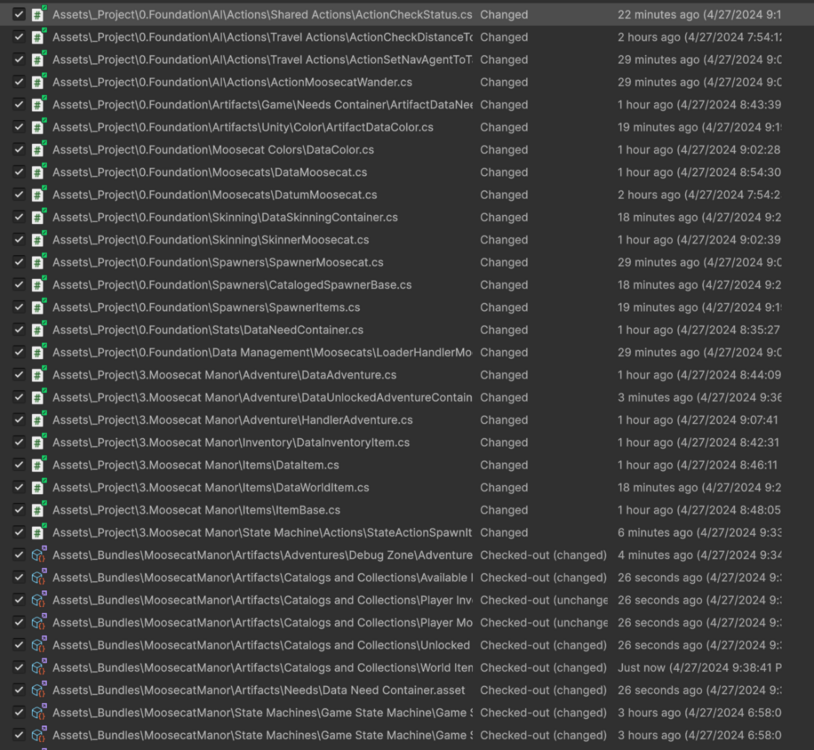
Alright, I didn't expect to do a bunch of coding today. But sometimes you get inspired and the changes just kind of flow in a beautiful way. I've now got three unique concepts for data storage. The keyed database, this acts like a very fancy serializable dictionary. The keyless database, this acts like a very fancy list with all the bells and whistles. Finally there is the catalog which acts like a read-only combination of the prior two sentences. I was able to remove between 1 and 2 hundred lines of code today. Without actually limiting myself in any appreciable way. As far as refactoring goes, this felt exceptionally productive. But now, my eyes are heavy and I want to make sure I get a good night's rest. So I'll leave you with a part of the commit for the night.
-
Switching the adventures over from the old system to catalogs was fast and basically painless. There is still more to be done to make adventures less poor to work with. I've split the adventures out from the auto adventures that kitties can start up. I may even split out the adventure handler to be one for regular adventures and one for Moosecat auto adventures. I figure the UI can just read both to populate things. There was no real reason to put them together. This is a mistake I won't make again, until I do. At any rate, I'm going to reward myself for a long work week of Moosecats and actual work. Time to play some kind of game, not sure what yet.
-
Alrighty! Spawning is now gangbusters! I really like where it is. So I think the next thing we need to refactor is the needs system for the Moosecats. There is "something" about it that I'm not liking. It is too easy to get a mismatch with data. This might be from my old bugs that caused it but fundamentally I don't like the issue. So tonight I'm going to ruminate on a solution and hopefully tomorrow we can implement it!
-
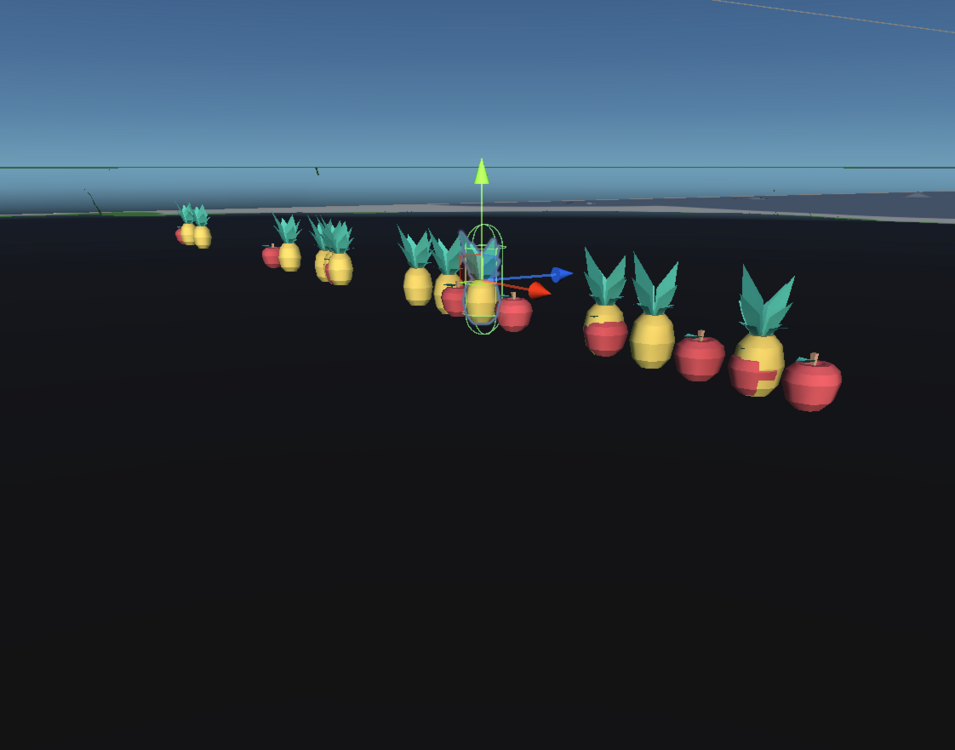
Alright, well, that IS less than ideal. I've moved our spawn request logic into a state action. Because it honestly makes more sense for it to live there than it would on a particular gameobject. The plan is pretty simple, anything, anywhere, can request items from the spawn system and then they can choose to position those spawned assets anywhere they need and do anything extra to them after the fact. Unfortunately I need to fix a few things tomorrow. The first is that the positional data is wack, clearly a few problems here: 1) They are all spawning in a thin line. 2) They are all spawning under the nav mesh (woops). Otherwise though, if you ignore these two game breaking issues it is basically perfect! So, given how heavy my eyes are at the moment, I am going to do just that.
-
Sneaking in real late tonight! Just finished the Fallout series (season 1) and it was incredible. Absolutely soul crushing at times, anxiety riddling at others, and all around just filled top to bottom with misery. I couldn't do that kind of show all the time but it made me feel things and all around I'm happy that it exists. What an exceptional example of truly talented people pulling off something incredible. As for my own work, the spawner is refactored! It is much more powerful than the prior version and now it isn't limited by a single type of item. Now *any* item can be spawned as long as I have the ID for it. They'll be spawned enabled or disabled as needed, pull from the pool as needed, and just all around I'm pleased as punch. I forget what I said I need to resolve besides the spawner in our prior post. I'll check it tomorrow and get started on that. But overall, what a day.
-
I know for some folks this is the most miserable part of coding. You hit a golden point in your work and realize certain systems are unsustainable. As you get better these become less common but I do think there is merit in trying things then iterating on them to get the perfect outcome for you. We are nearly done with the refactoring of cataloging and spawning. I'm very excited as these are pivotal systems for the future of the game. I'm on a phone at the moment because we watched Fallout late into the evening but tomorrow o don't have a workout. That gives me plenty of time to go over it in more detail and maybe include some visual aids!


